Jump to HeaderJump to Main ContentJump to Footer
Michigan State University
Digital Experience Studio

University Communications and Marketing

Digital Experience Studio

  • Experience Program
    • Website Project Process
    • Working with a Vendor
    • Glossary
    • Taxonomy Data Dictionary
  • |
  • Experience Design
    • Website Strategy
    • Website Structure
    • Information Architecture and Navigation
    • User-Centered Design Conventions
    • Common UX Issues
    • Enterprise Design System
    • Content Planning
    • Creating Accessible Content
    • Taxonomy and Filters
  • |
  • Website Technology
    • Web Standards
    • Search Engine Optimization
    • Cascade CMS
    • Sitecore CMS
    • Content Hub Overview
    • Content Hub DAM
    • Content Hub Operations

    SitecoreAI

    Sitecore user login
  • |
  • Social Media
    • Alt Text Bookmarklet
    • Meta Ad Pixel
    • Social Media and Web Integration
    • Sprinklr

    Sprinklr

    Sprinklr user login
  • |
  • Analytics
    • Google Analytics (GA4)
    • Testing
    • Data Visualization

    Google Analytics

    Google Analytics user login
  • |
  • News and Events
    • News and Updates
    • Events and Trainings
Digital Experience Studio

University Communications and Marketing

  • Experience Program
  • Experience Design
  • Website Technology
  • Social Media
  • Analytics
  • News and Events

< Experience Program

  • Website Project Process
  • Working with a Vendor
  • Glossary
  • Taxonomy Data Dictionary

< Experience Design

  • Website Strategy
  • Website Structure
  • Information Architecture and Navigation
  • User-Centered Design Conventions
  • Common UX Issues
  • Enterprise Design System
  • Content Planning
  • Creating Accessible Content
  • Taxonomy and Filters

< Website Technology

  • Web Standards
  • Search Engine Optimization
  • Cascade CMS
  • Sitecore CMS
  • Content Hub Overview
  • Content Hub DAM
  • Content Hub Operations

SitecoreAI

Sitecore user login

< Social Media

  • Alt Text Bookmarklet
  • Meta Ad Pixel
  • Social Media and Web Integration
  • Sprinklr

Sprinklr

Sprinklr user login

< Analytics

  • Google Analytics (GA4)
  • Testing
  • Data Visualization

Google Analytics

Google Analytics user login

< News and Events

  • News and Updates
  • Events and Trainings
Digital Experience Studio > Website Technology > Website Standards and Best Practices >

MSU Search Tool

Michigan State University

MSU Tools and Resources

  • A to Z Index
  • Find People
  • Email
  • Tech Support
  • Social Media Directory

Communications Resources

  • University Communications and Marketing
  • University Trademarks and Licensing
  • MSU Brand Studio
  • MSU Editorial Style Guide
  • MSU Photos

Contact us

517-355-7505

Address

Michigan State University 408 West Circle Drive East Lansing, MI 48824

Follow Us

  • Visit our Facebook page
  • Visit our page on X
  • Visit our Instagram page
  • Visit our LinkedIn page
  • Visit our YouTube page
  • Visit our TikTok page

If you're having accessibility issues, please let us know.

Know MoreTransparency Reporting: Budget & Salary/Compensation
Michigan State University
  • Contact Information|
  • Site Map|
  • Privacy Statement|
  • Site Accessibility|
  • Call MSU: (517) 355-1855|
  • Visit: msu.edu|
  • Notice of Nondiscrimination|

SPARTANS WILL|© Michigan State University|

MSU Search Tool

The search tool consists of a search box, the text “Search…” and a search button/icon shaped like a magnifying glass.

It assists a visitor in locating information from the website they are currently on and from other related MSU webpages managed across the entire university. 

Search Tool Standards and Placement

General Standards

  • The search tool is required on every institutional webpage.
  • Search results for the current website are displayed first.
  • The search results screen enables searching across every university webpage.
  • The search tool is 319 pixels wide by 28 pixels tall, with a roundness of 3 pixels.
  • The magnifying glass icon is 16 pixels by 16 pixels.
  • The search tool should be aligned with the MSU masthead, which is vertically centered in the 60 pixels from the top of the webpage.
  • Vertically center the MSU masthead within the 60 pixels and align with the search tool.
  • For technical implementation details, refer to the Search Tool Implementation Guide.
  • Exemption: Intercollegiate Athletics

Additional Standards for Mobile

Designing for mobile devices requires special consideration.

Mobile and tablet screen aspect ratio and resolution vary across devices and operating systems. The layout and spacing information in this section provides guidance on placement and presentation of required elements on mobile devices.

  • Align with top margin of the web layout.
  • Vertically center the MSU masthead and search tool in masthead region.
  • Align a search tool button with right webpage content margin.
  • Do not place any additional elements within or above this region.
  • Do not fill the area behind the MSU masthead and search tool with a background color or image that is different from the background used in the website’s design.

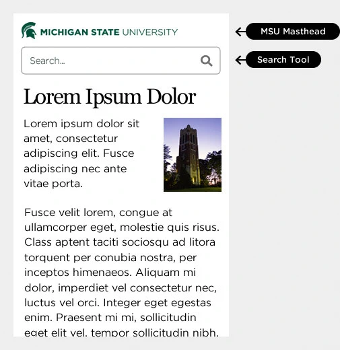
The University Communications website’s mobile MSU masthead
Figure 1: The University Communications website’s mobile MSU masthead — visit the University Communications website to view the entire site. 

Alternate Placement of Search Tool for Mobile

Units may place the search box below the MSU masthead in place of the search button.
Alternate search box placement for mobile layouts
Figure 2: Alternate search box placement for mobile layouts 

Use of Search Tool

  • Use approved, unaltered versions only.
  • Use u.search.msu.edu to display search results.
  • Do not place more than one search tool on a webpage.
  • Verify and adjust background image to ensure accessibility color contrast when using the semitransparent search box.
  • Do not combine with any other marks, graphic elements or words.

Acceptable Search Tool Variations

  • Standard: white fill and 1 pixel stroke set to #666666
  • Semitransparent: no fill, 1 pixel stroke set to #FFFFFF and 50% transparent white search button/icon
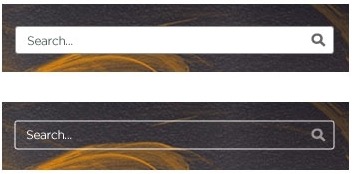
Search tool variations
Figure 3: Search tool variations

Unacceptable Search Tool Variations

  • Do not reconfigure or resize the search icon.
  • Do not alter the placeholder text inside the search box.
  • Do not change the size of the search box.
  • Do not remove the search box border.
  • Do not change the style, width or color of the search box border.
  • Do not add drop shadow effects to the search box.
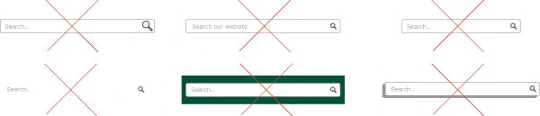
Samples of unacceptable search tool variations
Figure 4: Samples of unacceptable search tool variations 

Exceptions

  • Please work with University Communications and Marketing to address questions about required elements.
  • Units may request an exception to display additional search tools. For example, tools for searching a course catalog, knowledge base or library book/journal.

Additional Required Elements

MSU Masthead

Learn more

Website Name

Learn more

Legal Footer

Learn more