Jump to HeaderJump to Main ContentJump to Footer
Digital Experience Studio

University Communications and Marketing

  • Experience Program
  • Experience Design
  • Website Technology
  • Social Media
  • Analytics
  • News and Events

< Experience Program

  • Website Project Process
  • Working with a Vendor
  • Glossary
  • Taxonomy Data Dictionary

< Experience Design

  • Website Strategy
  • Website Structure
  • Information Architecture and Navigation
  • User-Centered Design Conventions
  • Common UX Issues
  • Enterprise Design System
  • Content Planning
  • Creating Accessible Content
  • Taxonomy and Filters

< Website Technology

  • Web Standards
  • Search Engine Optimization
  • Cascade CMS
  • Sitecore CMS
  • Content Hub Overview
  • Content Hub DAM
  • Content Hub Operations

SitecoreAI

Sitecore user login

< Social Media

  • Alt Text Bookmarklet
  • Meta Ad Pixel
  • Social Media and Web Integration
  • Sprinklr

Sprinklr

Sprinklr user login

< Analytics

  • Google Analytics (GA4)
  • Testing
  • Data Visualization

Google Analytics

Google Analytics user login

< News and Events

  • News and Updates
  • Events and Trainings
Michigan State University

MSU Tools and Resources

  • A to Z Index
  • Find People
  • Email
  • Tech Support
  • Social Media Directory
Michigan State University
Digital Experience Studio

University Communications and Marketing

Digital Experience Studio

  • Experience Program
    • Website Project Process
    • Working with a Vendor
    • Glossary
    • Taxonomy Data Dictionary
  • |
  • Experience Design
    • Website Strategy
    • Website Structure
    • Information Architecture and Navigation
    • User-Centered Design Conventions
    • Common UX Issues
    • Enterprise Design System
    • Content Planning
    • Creating Accessible Content
    • Taxonomy and Filters
  • |
  • Website Technology
    • Web Standards
    • Search Engine Optimization
    • Cascade CMS
    • Sitecore CMS
    • Content Hub Overview
    • Content Hub DAM
    • Content Hub Operations

    SitecoreAI

    Sitecore user login
  • |
  • Social Media
    • Alt Text Bookmarklet
    • Meta Ad Pixel
    • Social Media and Web Integration
    • Sprinklr

    Sprinklr

    Sprinklr user login
  • |
  • Analytics
    • Google Analytics (GA4)
    • Testing
    • Data Visualization

    Google Analytics

    Google Analytics user login
  • |
  • News and Events
    • News and Updates
    • Events and Trainings
Digital Experience Studio > Website Technology > Content Hub > Content Hub Operations > Workflows >

Reconcile Edits

Reconcile Edits

Once the Editing Team has completed their review, the content is returned to the content author to incorporate final edits. During this stage, the author reconciles all suggested changes and ensures the story is ready for transfer into Content Hub.

Note: Not all content sub-types go through this formalized edit reconciliation stage in Content Hub Ops. However, it is the expectation that all content is properly edited and follows internal production protocols.

Reconcile Edits and Finalize Document

Communications Resources

  • University Communications and Marketing
  • University Trademarks and Licensing
  • MSU Brand Studio
  • MSU Editorial Style Guide
  • MSU Photos

Contact us

517-355-7505

Address

Michigan State University 408 West Circle Drive East Lansing, MI 48824

Follow Us

  • Visit our Facebook page
  • Visit our page on X
  • Visit our Instagram page
  • Visit our LinkedIn page
  • Visit our YouTube page
  • Visit our TikTok page

If you're having accessibility issues, please let us know.

Know MoreTransparency Reporting: Budget & Salary/Compensation
Michigan State University
  • Contact Information|
  • Site Map|
  • Privacy Statement|
  • Site Accessibility|
  • Call MSU: (517) 355-1855|
  • Visit: msu.edu|
  • Notice of Nondiscrimination|

SPARTANS WILL|© Michigan State University|

  1. The content author should carefully review the edits provided in the shared Word document and apply any necessary adjustments.
  2. If the story was initiated by a student, the student author must consult with their supervising staff member before proceeding to the next step. This extra review ensures that all student-created content meets MSU editorial and governance standards.
  3. Once all edits are addressed and the story is ready for publishing, the content author clicks the Finalize Document button at the top of the content details page.

The Finalize Document button appears on the right side of the toolbar with the content item name on the left.
Fig. 1: The “Finalize Document” button appears at the top of the page. Here it is marked in red.

Clicking the “Finalize Document” button signals that the story is complete and ready to be transferred from Word into the final content fields inside Content Hub. The state changes to “Load Text.”
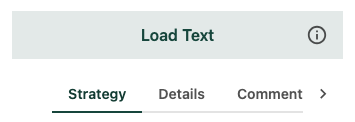
The Strategy, Details and Comment tabs appear below the status indicator, which reads
Fig. 2: After the “Finalize Document” button is clicked, the state transitions to “Load Text.” 


Documentation updated: June 18, 2025

Is there an issue with this documentation? Report it here.