Jump to HeaderJump to Main ContentJump to Footer
Michigan State University
Digital Experience Studio

University Communications and Marketing

Digital Experience Studio

  • Experience Program
    • Website Project Process
    • Working with a Vendor
    • Glossary
    • Taxonomy Data Dictionary
  • |
  • Experience Design
    • Website Strategy
    • Website Structure
    • Information Architecture and Navigation
    • User-Centered Design Conventions
    • Common UX Issues
    • Enterprise Design System
    • Content Planning
    • Creating Accessible Content
    • Taxonomy and Filters
  • |
  • Website Technology
    • Web Standards
    • Search Engine Optimization
    • Cascade CMS
    • Sitecore CMS
    • Content Hub Overview
    • Content Hub DAM
    • Content Hub Operations

    SitecoreAI

    Sitecore user login
  • |
  • Social Media
    • Alt Text Bookmarklet
    • Meta Ad Pixel
    • Social Media and Web Integration
    • Sprinklr

    Sprinklr

    Sprinklr user login
  • |
  • Analytics
    • Google Analytics (GA4)
    • Testing
    • Data Visualization

    Google Analytics

    Google Analytics user login
  • |
  • News and Events
    • News and Updates
    • Events and Trainings
Digital Experience Studio

University Communications and Marketing

  • Experience Program
  • Experience Design
  • Website Technology
  • Social Media
  • Analytics
  • News and Events

< Experience Program

  • Website Project Process
  • Working with a Vendor
  • Glossary
  • Taxonomy Data Dictionary

< Experience Design

  • Website Strategy
  • Website Structure
  • Information Architecture and Navigation
  • User-Centered Design Conventions
  • Common UX Issues
  • Enterprise Design System
  • Content Planning
  • Creating Accessible Content
  • Taxonomy and Filters

< Website Technology

  • Web Standards
  • Search Engine Optimization
  • Cascade CMS
  • Sitecore CMS
  • Content Hub Overview
  • Content Hub DAM
  • Content Hub Operations

SitecoreAI

Sitecore user login

< Social Media

  • Alt Text Bookmarklet
  • Meta Ad Pixel
  • Social Media and Web Integration
  • Sprinklr

Sprinklr

Sprinklr user login

< Analytics

  • Google Analytics (GA4)
  • Testing
  • Data Visualization

Google Analytics

Google Analytics user login

< News and Events

  • News and Updates
  • Events and Trainings
Digital Experience Studio > Website Technology > Content Hub > Content Hub Operations >

Content Types, Sub-Types and Templates

Michigan State University

MSU Tools and Resources

  • A to Z Index
  • Find People
  • Email
  • Tech Support
  • Social Media Directory

Communications Resources

  • University Communications and Marketing
  • University Trademarks and Licensing
  • MSU Brand Studio
  • MSU Editorial Style Guide
  • MSU Photos

Contact us

517-355-7505

Address

Michigan State University 408 West Circle Drive East Lansing, MI 48824

Follow Us

  • Visit our Facebook page
  • Visit our page on X
  • Visit our Instagram page
  • Visit our LinkedIn page
  • Visit our YouTube page
  • Visit our TikTok page

If you're having accessibility issues, please let us know.

Know MoreTransparency Reporting: Budget & Salary/Compensation
Michigan State University
  • Contact Information|
  • Site Map|
  • Privacy Statement|
  • Site Accessibility|
  • Call MSU: (517) 355-1855|
  • Visit: msu.edu|
  • Notice of Nondiscrimination|

SPARTANS WILL|© Michigan State University|

Content Types, Sub-Types and Templates

There are a few foundational items to understand about how content is created and managed in Content Hub Ops:

  • Content Type – The content type refers to the broad “bucket” of how the content item is classified. For example, Stories and Email are content types.
  • Content Sub-Type – The content sub-type is a further categorization of the content within the context of the broader content type bucket. For example, “News release” is a sub-type of Stories. “Community Letter” is a sub-type of Email.
  • Content Template – Content templates define the content item’s structure, available copy fields (for stories) and available metadata and taxonomy fields for use in the item. The selected Content Sub-Type determines which Content Template is used.
  • Workflow – The workflow a content item must proceed through, from initial creation through to publishing, depends on the Content Sub-Type. See “Workflows Overview” for more detailed information. 

When a content item is created, the user must first select a Content Sub-Type and then a Content Template. These then control the workflow, structure, fields and (for stories) layout of the final content in MSUToday. 
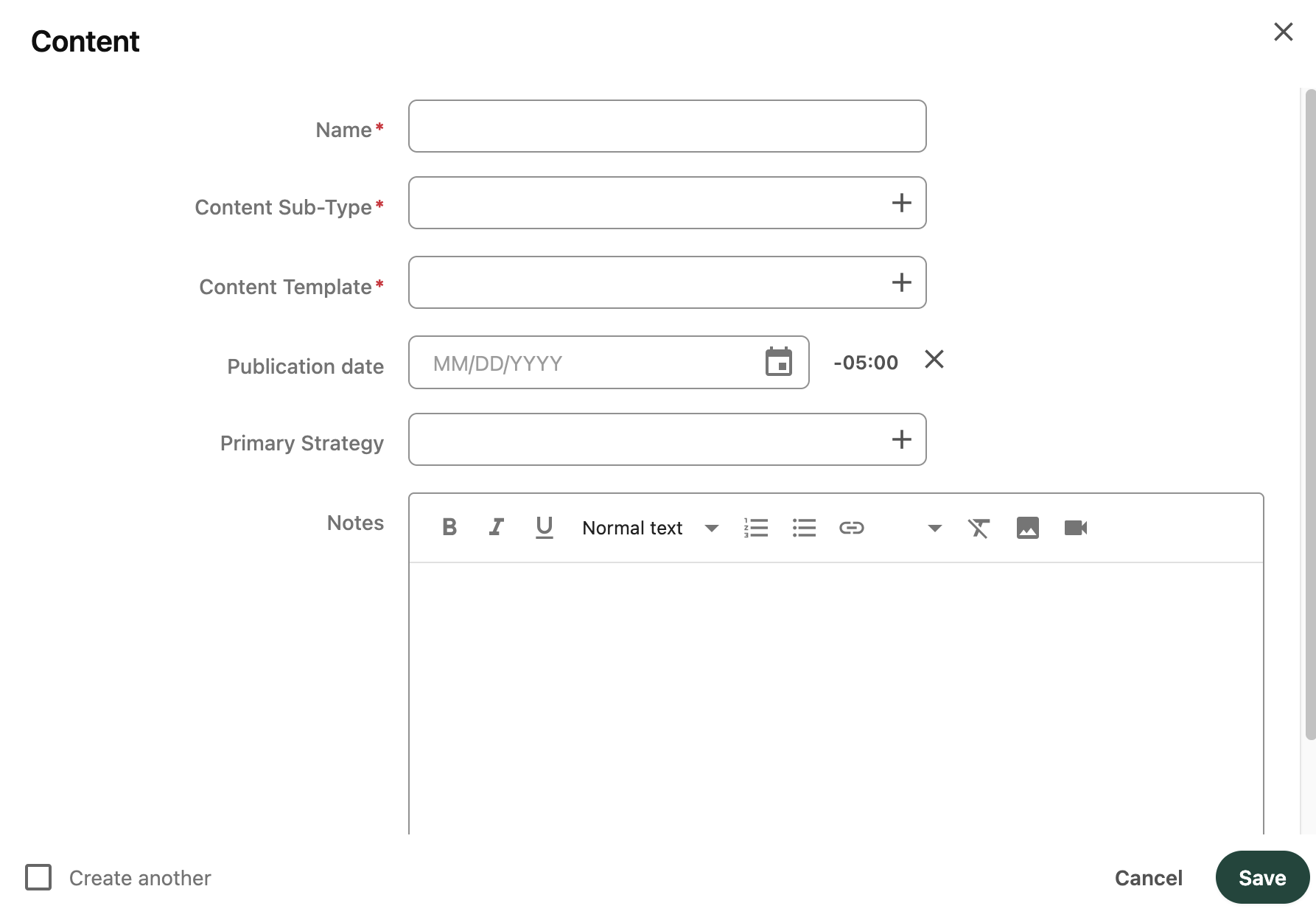
The content creation panel requires selection a content sub-type and template.
Fig. 1: When a content item is created, the user must select a Content Sub-Type and Content Template, in that order.


Note: When creating a new content entry, always select the Content Sub-Type first, then the Content Template. The Content Sub-Type field controls the available Content Templates. If selected in the reverse order, the available templates will be incorrect, and the content the item will need to be removed and recreated. 

Available Content Templates

Each Content Template is only valid for use with a specific set of Content Sub-Type(s). For example, a new “News Release” story sub-type can only use the “Standard Story” content template. A “Statements” story sub-type can only use the “Brief Story” content template. This helps to ensure a quality, cohesive digital experience for audience members. 

The table below includes an overview of available content types and sub-types, corresponding content templates and their respective workflow groups. See "Workflows Overview" for additional information about workflows.

Content Template Fields and Structure

Content Templates define the structure, copy fields (for stories), metadata and taxonomy fields available for each content item. When a content item is created with a specified content sub-type and content template, the system automatically determines the structure of the content item as previously defined for the specific template. 

Each content template field is defined in the data model as a specific data type. For example, Name and Title fields are defined as a single-line text string field. Meta Description is defined as a multi-line string text field. Text Box is a rich text field that allows for markup styling, inserting media and images, etc. Topics are defined as a list of available taxonomy values.

Each Content Template data field is presented on the Content Hub content item details page. Fields are grouped either the main Copy authoring panel (on the left), the Detail panel (a tab in the right sidebar) or the Strategy panel (a tab in the right sidebar). See Fig. 2.
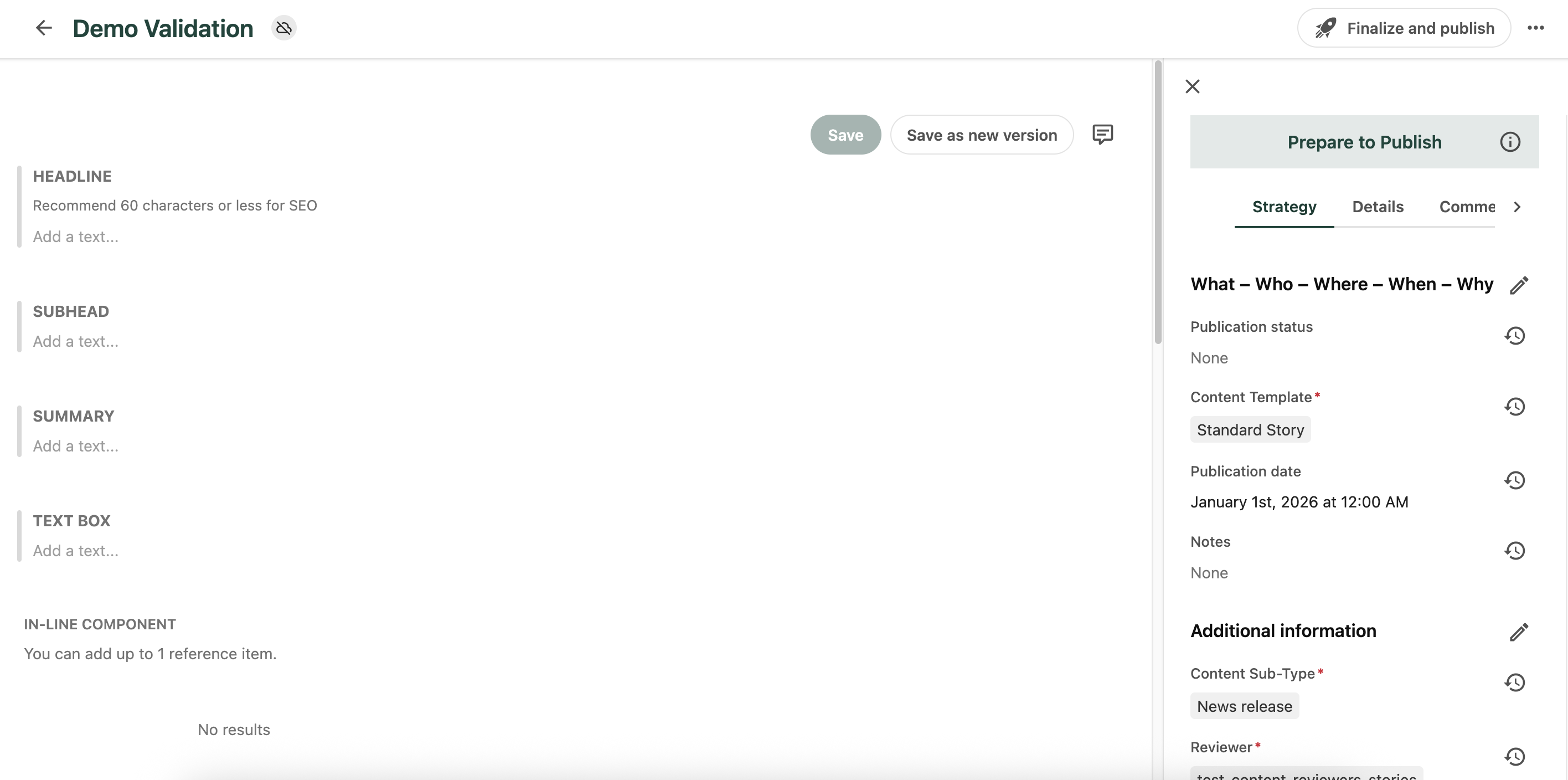
The content panel includes a copy area and a strategy area.
Fig. 2: On the content item details page, the copy panel appears on the left. The Strategy and Details tabs appear in the right sidebar.

For detailed information on each field available for each content template, please refer to the table below. Each field in the table is specified as applicable to either all content templates or to specific content template(s), noted in the Content Template column.


Documentation updated: Mar. 18, 2026

Is there an issue with this documentation? Report it here.