University Communications and Marketing uses a validation workflow to ensure that taxonomy and metadata fields are properly completed. This is a quality assurance process designed to maintain the quality of asset tagging and the overall integrity of the search and filtering system. Assets will not be visible in the DAM to other users until the assets have successfully completed the asset approval workflow.
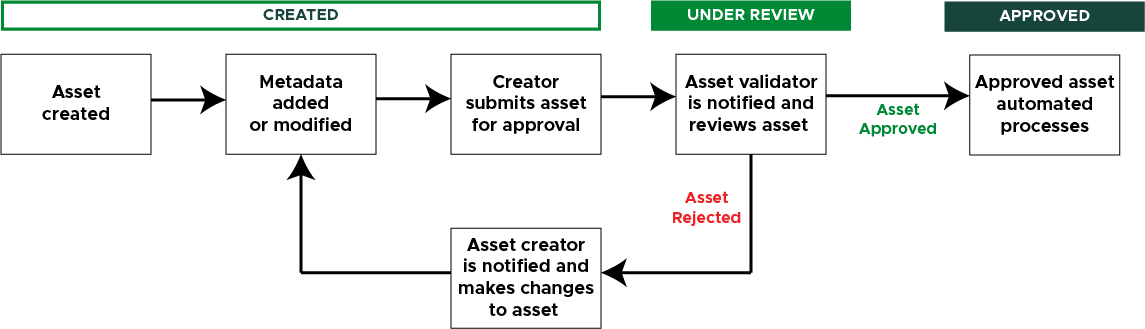
Below is a flowchart of the asset approval workflow:
Workflow States
An asset can be in one of four states within the system:
- Created: The asset has been uploaded into the system but is only visible to the asset creator. This is typically the state the asset is in when the asset creator adds metadata information before submitting it for approval from Asset Validators.
- Under Review: The asset has been submitted for approval. It is not visible on the Assets page, only on the Review page. The assigned validator, based on the asset type, will receive a notification that an asset is ready for review. The reviewer can view the asset and approve or reject it.
- If the asset is approved, it will become visible to everyone in the DAM (unless visibility restrictions are enabled).
- If the asset is rejected, the asset creator receives a notification, and the asset remains visible only to the asset creator. The creator can make updates and resubmit for approval.
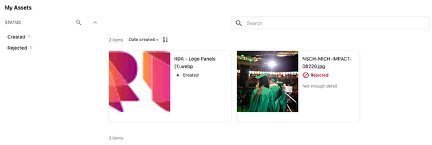
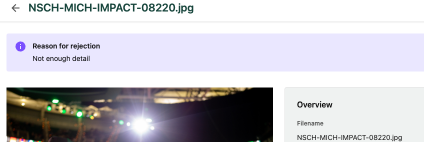
- Rejected: An Asset Validator has moved the asset from Under Review to Rejected and provided a reason for this action. The Asset Creator can resubmit for approval after making changes to address the Asset Validator’s concerns. An asset in the Rejected state is only visible on the Create page for the Asset Creator; it is not visible on the Assets page.
- Approved: A designated Asset Validator, based on asset type, has moved the asset from Under Review to Approved. Once approved, an asset is visible to all users with access to the DAM, unless visibility restrictions are applied by an asset admin.
Identifying an Asset’s State
The current state of any asset can be seen on the asset’s details page in the top-right corner.

The current state of all assets for a particular Asset Creator also can be found on the asset cards within the My Assets panel on the user’s home page.
Asset Validation Assignments
Assets uploaded by University Communications and Marketing staff flow through the validation workflow to a specific validator based on the asset type assigned during the metadata entry during asset creation.
To view asset validator user group assignments by asset type, see “Guidance for UCAM Staff DAM Use.”
Submitting Assets for Approval
To move an asset from the Created state to the Under Review state, an Asset Creator can:
- Click the box with an arrow (Submit for approval) icon on the asset card on the Create page, or
- Click the Submit for Approval button on the Asset Details page
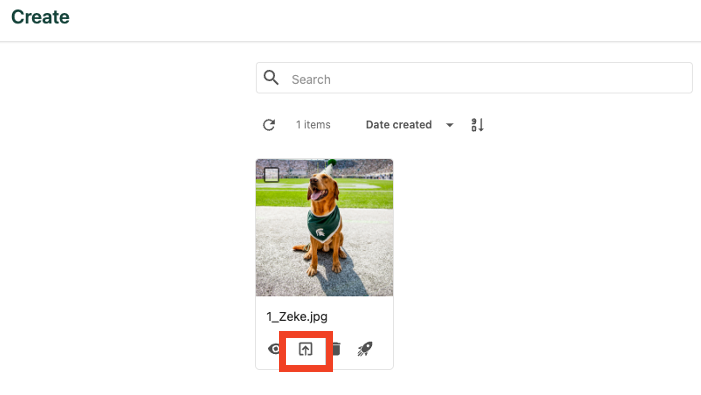
To submit multiple assets for approval:
- Select the asset using the checkbox at the top left corner of each asset card on the Create page or use the cursor tool to click, drag and select the items to be submitted.
- Click the box with an upward arrow (“Submit for approval”) icon at the top of the Create page.

Advancing Assets Through the Workflow
Assets can be moved through the asset workflow stages by Asset Validators or Asset Admins. Only users within a relevant Asset Validator user group will receive notifications when an asset enters the asset workflow.
To view assets that must be reviewed, approved and/or rejected:
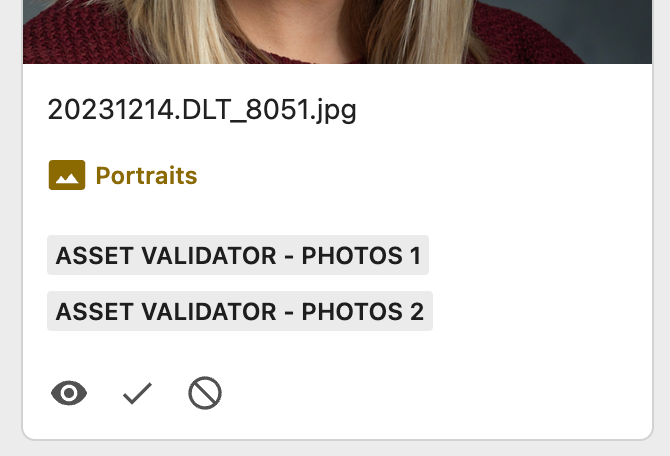
- Click the Review tab to open the Review page. The Review page will display all asset cards for all assets ready for review. Asset cards include an asset thumbnail and additional information, such as the title, asset type (often shown in colored text with an icon), as well as any Asset Validator groups associated with the asset type .
- Click on an asset to view its asset details.
- Determine if the asset is to be approved or rejected.
- Click the checkmark icon to approve the asset or the cancel icon to reject the asset. If the asset is rejected, provide the reasoning so the Asset Creator can correct and resubmit for approval.
Alternative: Asset Validators also can approve or reject an asset from the Asset Details page by clicking the review options located at the top right corner of the page.

Documentation updated: Sept. 22, 2026
Is there an issue with this documentation? Report it here.
Note: Here are a few items that should be considered by validators evaluating assets during the review process: